If your interested in making your own voxel art or games you’ll need a voxel editor to get started. We have a list of the best voxel editors for creating voxel art for graphics as well as games.
What is a Voxel Editor?
A voxel editor is special type of software used by artists to create 3D voxel models. Once constructed these voxel models can be used for several purposes such as photos for social media and 3D models for video games.
Check our list of voxel software below:
MagicaVoxel

MagicaVoxel is a free voxel editor actively developed by @ephtracy for creating voxel art models. It has all the tools you need to delete, edit, add and paint voxels. It also ships with a powerful rendering engine for creating some amazing images for sharing. If you want to use the model in a game engine or separate 3D program, it also supports obj export. Best of all its 100% free for personal and commercial projects.
Read more about the Magicavoxel Voxel Editor
Features:
- Full Featured Voxel Editor for Adding, Editing, Deleting and Painting Voxels
- Free to use for Personal and Commercial Projects
- Powerful Built-In Rendering Engine
- Multiple Export Formats including .OBJ, .VOX, .QB, and .PNG
- Large Community of Voxel Artists For Support
Supported Platforms: Windows, macOS
Price: Free
Installation Instructions: How to Install MagicaVoxel
Interested in learning MagicaVoxel? Check out our free MagicaVoxel Tutorials!
Mega Voxels

Mega Voxels is a powerful mobile voxel editor developed exclusively for iOS and Android for creating voxel art models on smartphones and tablets. This voxel builder is packed with different tools and features so you can add, delete and paint voxel models. It comes with instant rendering and ambient occlusion that allows you to share crisp images and videos quickly and easily. It also has a built in shop where you can can browse hundreds of voxel models on demand. The app is also game engine friendly with built in support for the obj export format. It also works wells with MagicaVoxel with a built in vox exporter as well. And last but not least this voxel app gives artists the ability to create turntable videos of their voxel creations for sharing to popular social networking sites such as Instagram and Twitter. This powerful app to allows for voxel art creation on the go!
Read more about the Mega Voxels Editor
Features:
- Full Featured Mobile Voxel Editor for Adding, Deleting and Painting Voxel Models
- Create and Take your Voxel Models wherever you go!
- View your 3D voxel models in Augmented Reality
- Free to use for Personal and Commercial Projects
- Built-In Shop with Hundreds of Voxel Models
- Instant Ambient Occlusion Rendering
- Lots of Particle Effects to add to your scene
- Several Filters to add to your photos and videos
- Multiple Export Formats including .OBJ and .VOX
- Create Photos and Videos of your voxel models
Supported Platforms: Android, iOS, ChromeOS
Price: Free
Download for Free on Android: Get Mega Voxels on Google Play
Download for Free on iOS: Get Mega Voxels on the App Store
Want to learn how to use Mega Voxels? Check out our free Mega Voxels Tutorials!
Qubicle

Qubicle is a powerful voxel editor developed by Minddesk for creating voxel models for images and games. Like MagicaVoxel, it also supports tools for creating and editing voxel models. Qubicle does have some features in the software you won’t find anywhere else however, like an unlimited matrix size (size of the model) and easy to use color editor. One huge advantage of Qubicle is the export formats it supports such as FBX, DAE, and OBJ. This makes it very attractive voxel software for game developers. Many hit games have been developed using Qubicle including Crossy Road and Shooty Skies. There is a free trial that comes with all the functionality that can be downloaded from there website. If you want the exports there is a one time fee.
Read more about the Qubicle Voxel Editor
Features:
- Full Fledged Voxel Editor with the ability to Add, Edit, Delete and Paint voxels
- Large Set of Pre-made commands to assist in the creation of voxel art
- Support for Voxel models larger than the traditional 128x128x128 constraint of MagicaVoxel
- Numerous export options including .FBX and .DAE, which are widely used file types in Game Development
- Great Track Record of Award Winning Games including Crossy Road and Shooty Skies
Supported Platforms: Windows, macOS
Price: Free Trial (no export), $99 Indie License
Installation Instructions: How to Install Qubicle
Interested in learning how to use Qubicle? Try out our free Qubicle Tutorials!
VoxEdit

VoxEdit is a free software by Pixowl for creating voxel models for The Sandbox Game. It supports Windows and Mac. It is similar to MagicaVoxel and Qubicle as it also supports a common feature set such as editing, deleting and creating voxels. A unique feature of VoxEdit however is the ability to not only rig character voxel models created in VoxEdit but also animate them as well. The current version is in Beta and is free to download and use.
Read more about VoxEdit Voxel Editor
Features:
- Full Featured Voxel Editor for creating voxel models
- Built in rigging tools for animating voxel characters
- Free to Download and Use
- Support for the Sandbox Game
Supported Platforms: Windows, macOS, Linux
Price (Desktop): Free
Installation Instructions: How to Install VoxEdit
Want to learn how to create voxel art using VoxEdit? View our free VoxEdit Tutorials!
Goxel
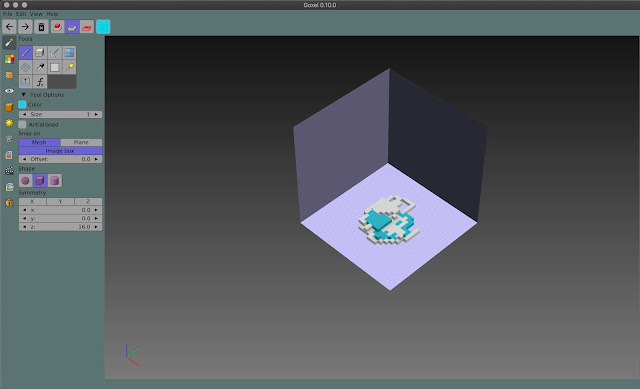
Goxel is a free, open-source voxel editor designed for creating 3D models using simple, block-based building. It features intuitive tools for modeling, coloring, and rendering, with support for layers, symmetry, and export to popular 3D formats. Available on a variety of platforms including Windows, macOS, Linux, iOS and Android. Goxel is popular among artists and game developers for its ease of use and flexibility.
Read more about Goxel Voxel Editor
Features:
- Full Featured Voxel Editor for Windows, macOS, Linux, iOS, and Android
- Includes layers, symmetry modes, and easy voxel painting and sculpting features
- Supports exporting to formats like OBJ, PLY, and VOX for use in other 3D tools
- Freely available under the GPL license, allowing users to modify and extend its functionality
Supported Platforms: Windows, macOS, Linux, iOS, Android
Price (Desktop): Free
Installation Instructions: How to Install Goxel
Want to learn how to create voxel art using Goxel? View our free Goxel Tutorials!
Blender

Blender is an open-source modeling software for creating 3D models. It supports Windows, macOS and Linux. Unlike traditional voxel editors, Blender is a fully featured 3D modeling suite. You can model, animate, rig and export models directly inside the program. With minor modifications, Blender can be used to make and convert 3D models into voxel models. It is free to download and use for personal and commercial projects.
Features:
- Full Featured 3D Modeling Software
- Built in tools for modeling, rigging, animating and mapping models
- Free to Download and Use
- Many export options including FBX, DAE, OBJ and more
Supported Platforms: Windows, macOS, Linux
Price (Desktop): Free
Installation Instructions: How to Install Blender